



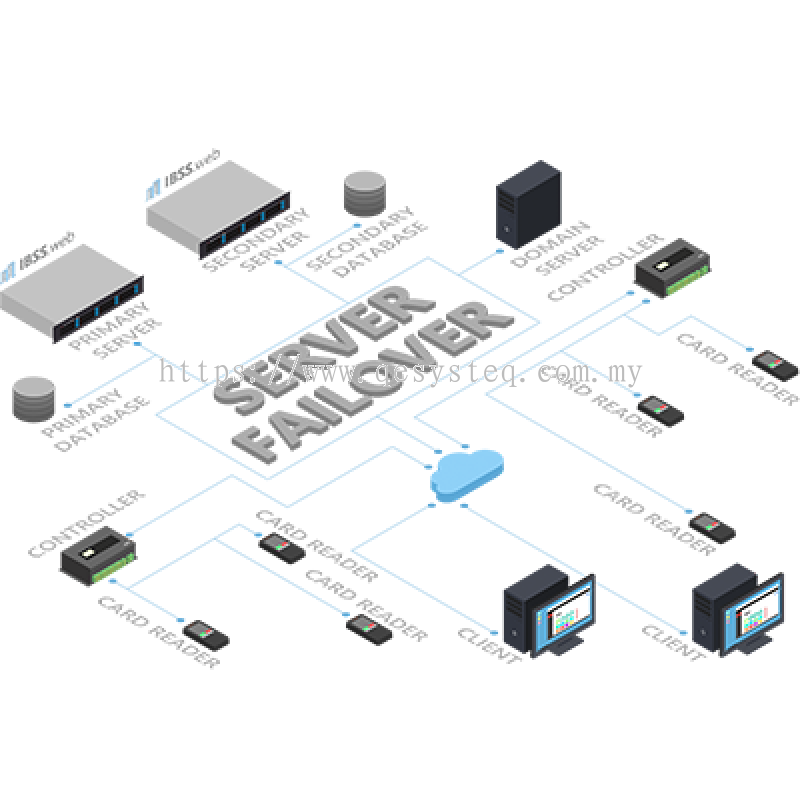
The Server Failover (SFO) module performs server redundancy and continuously performs data synchronization between 2 servers while monitoring the operational status of both. The IBSS.web software is built with an automatic failover architecture.
When the primary server fails or appears as unavailable, the server failover service will automatically switch operations and control to the secondary backup server. All connected clients and controllers will seamlessly reconnect to this server without disruption to the system operation.
Key Features
When the primary server fails or appears as unavailable, the server failover service will automatically switch operations and control to the secondary backup server. All connected clients and controllers will seamlessly reconnect to this server without disruption to the system operation.
Key Features
- Automatically performs continuous data synchronization between 2 servers
- Secondary takes over automatically when primary fails
- Eliminates downtime due to server hardware failure
- Zero downtime, no compromise on security
- Prevents Single Point of Failure (SPOF)
- Connected clients and controllers seamlessly reconnect to the new primary server
- Monitors the operational status and automatic switchover upon failure of primary server
Technical Specifications
| Specifications | IBSSweb-SFO |
| Description | IBSS.web Server Failover Service |
| Supported IBSS.web | IBSS.web Professional Edition or above (Prerequisite) |
| Availability Mode | Always On Availability Groups (AG) - Synchronous - commit with automatic failover |
| Quorum Witness | File Share Witness |
Prerequisites
| Software/Hardware | Minimum Requirement |
| Primary/Secondary Server | |
| Operating System | Windows Server 2016 |
| SQL Server | Microsoft SQL Server 2017 Standard Edition or above |
| Processor | Intel Xeon Quad Core 2GHz or above |
| Memory | 32GB RAM |
| Storage | 2x 300 GB SATA HDD |
| Ethernet | Gigabit (1000Base-T) |
| Domain Server | |
| Operating System | Windows Server 2016 |
| SQL Server | Microsoft SQL Server 2017 Express Edition or above |
| Processor | Intel Core i5 2GHz or above |
| Memory | 16GB RAM |
| Storage | 2x 300 GB SATA HDD |
| Ethernet | Gigabit (1000Base-T) |
Ordering Information
| Model No. | Description |
| IBSSweb-SFO | IBSS.web Server Failover Service |



