





eatures
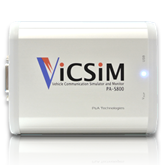 Simultaneous communication on 2x CAN and 2x LIN
ViCSiM hardware (USB interface) has two CAN channels and two LIN channels, which allow simultaneous simulation and monitoring of all channels with one application. With no line switching to deal with on the application, CAN and LIN operation becomes seamless.

 Simple and intuitive interface
ViCSiM is designed as simply and intuitively as possible so that you can do what you want to do quickly and easily while monitoring and simulating CAN/LIN communications. With this convenient device, you can monitor CAN/LIN communications, check the communication status with the target and perform transmission/reception tests anytime you want. For monitoring, all you have to do is press the [Start Monitoring] button after connecting the ViCSiM hardware to the target device and setting the communication speed. For a simulation, just directly describe the raw data of the CAN/LIN frames you want to transmit/receive and start the process.
 Easy simulation without programming
ViCSiM allows not only simpler one-shot frame transmission, continuous transmission simulation and response simulation to specified frames, but also easy simulation of CAN/LIN communication with no programming required by combining sequential simulations through log simulation functions. You can even perform a series of simulations in which you send a response frame to a request frame that is received irregularly with the “frame response function” while sequentially and periodically sending a frame with the “log simulation function.”
 Specialized for log playback simulator
The log playback simulation is performed by importing the log data from the CAN bus and the LIN bus. Communication is processed by the hardware without any application, providing the same performance as the original. Imported simulation data can be edited freely (e.g. create new data, copy/paste, insert or replace data) and executed seamlessly after editing.
 Customizable according to your needs
We can customize ViCSiM according to your requirements and help you develop original tools including adding to existing applications and developing unique systems using the ViCSiM device itself.
Examples: A diagnostic tool, an ECU manufacture test tool, an ECU data writing tool.
We will provide solutions according to your needs, using our expertise acquired through our extensive experience with the development of in-vehicle communication devices.
*A price quote will be provided separately.
What ViCSiM can do
Log playback simulation
ViCSiM acts as the original (target) to provide the same communication performance.
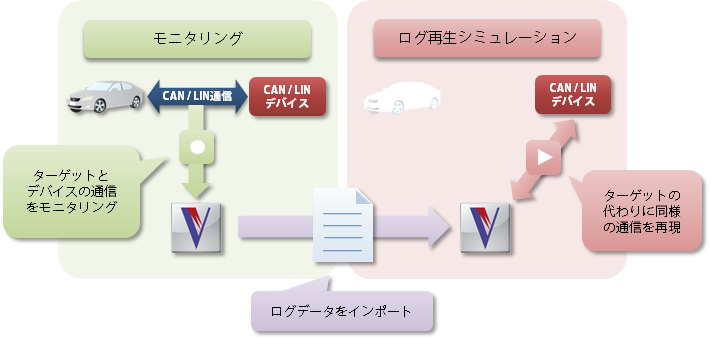 The ViCSiM log monitor allows monitoring of the communication log with the target. You can then perform the log playback simulation by importing the log data with the “log simulation function.”
It is very convenient for debugging the CAN/LIN devices that you are developing as ViCSiM provides the same operations as the target. You can select frames with only the IDs you need when importing log data. Frame transmission timing is automatically enabled with the log data time stamps. You can realize the same communication performance as the target by combining these two features.
Transmission/reception testing of CAN/LIN frames
ViCSiM periodically transmits frames or returns response frames to specified request frames.
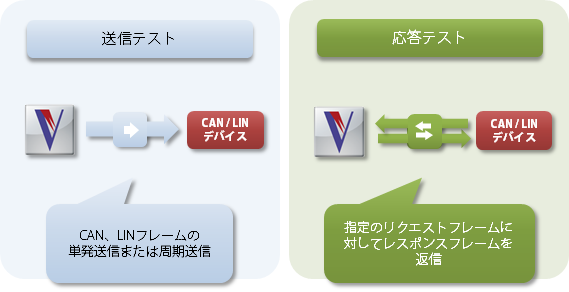
ViCSiM is ideal for debugging CAN/LIN devices you are developing in the early stages as it checks the communication status of the devices and performs transmission/reception tests for you.
You can transmit frames to the bus with the “frame transmission function” (or transmit headers in the case of LIN). Frame transmission is simplified and you can just click to perform a one-shot transmission or periodically transmit multiple frames you have selected.
The “frame response function” allows the ViCSiM to transmit predetermined response frames when it receives specified frames (or transmit responses to specified headers in the case of LIN). You can easily simulate the response by setting the condition for request frames and the response frame data.
Sequential CAN/LIN frame transmission/reception
ViCSiM helps you edit the content of CAN/LIN frame communications freely for seamless communication.
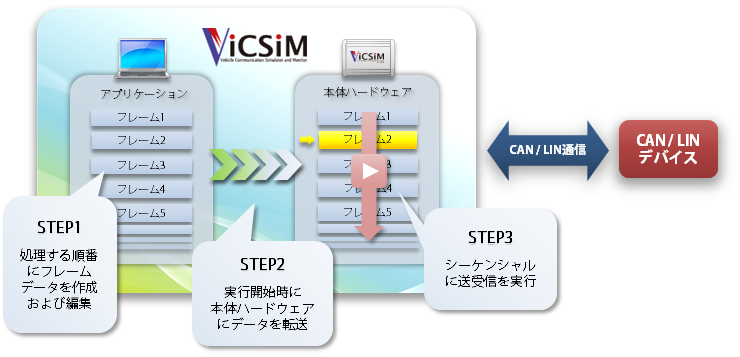
With the “log simulation function,” you can sequentially transmit/receive CAN/LIN frames by directly describing and executing the order you want it to communicate.
Frame data is simply described in raw data format and thus allows intuitive operation. The content of each frame including the IDs, data and transmission intervals can be edited freely. You can edit the content of communication and even create new data, copy/paste, and insert and replace data as if you are working in a text editor. ViCSiM seamlessly performs the communication accordingly. In the case of LIN, master node scheduled communication can be easily performed.
3 different simulation functions
ViCSiM has three main simulation functions.
You can either perform each one of them individually or do them simultaneously. Combining them provides a wider variety of simulations.
 Log simulation function
Performs sequential transmission and reception of frames. Runs like a source level debugger including execution by specifying the starting row, step execution, pauses at break points, and loop execution.
 Frame transmission function
Transmits frames to the bus. Allows one-shot and periodical frame transmission of specified frames. In the case of LIN, ViCSiM can transmit a header as a master node.
 Frame response function
Transmits response frames to specified request frames. In the case of LIN, ViCSiM transmits responses to a specified header as a slave node.
Monitoring function
ViCSiM helps you monitor the frames displayed on the bus. Monitoring can be performed during simulation as well.
 Log monitor
The log monitor allows the simultaneous monitoring of two CAN channels and two LIN channels. Prolonged logging is possible (the logging time depends on the HDD size. Data from specified frames is converted to physical values and plotted on a graph.
Device Specifications
| CAN | Channel | 2 channels |
|---|---|---|
| Standard | CAN 2.0B | |
| Baud rate | Select from 5kbps to 1Mbp | |
| Terminator | Yes (can be switched on/off) | |
| LIN | Channel | 2 channels |
| Standard | Standard / LIN 1.3, 2.0, 2.1, 2.2 (communication layer only) | |
| Baud rate | Select from 2400/9600/10400/19200bps | |
| Power supply | DC12V 100mA max. / Enter attached AC adapter from Vsup connector or DV12V (8-18V) from target I/F connector | |
| Pull-up | Yes (can be switched on/off) | |
| Log simulation function | Maximum number of registered frames | 100,000 frames |
| Frame transmission function | Maximum number of registered frames | 50 frames |
| Frame response function | Maximum number of registered frames | 2 x 50 frames |
| Log monitor | Maximum number of displayed frames | 1,000,000 frames |
| Dimensions | 120mm (W) x 95mm (D) x 40mm (H) | |
| Weight | 245g (main body) | |
| Power supply | USB bus power | |
| Target I/F | Dsub15pin male | |
| Host I/F | USB 2.0 High Speed Type B | |
| Memory | 32 MByte | |
| Temperature range | 0-50 ℃ (no condensation) | |
| OS | WindowsXP/Vista/7/8 32bit, Windows7/8 64bit | |
Please note that the specification may change without prior notice.



